The Anatomy of a Modern Serverless YAML File

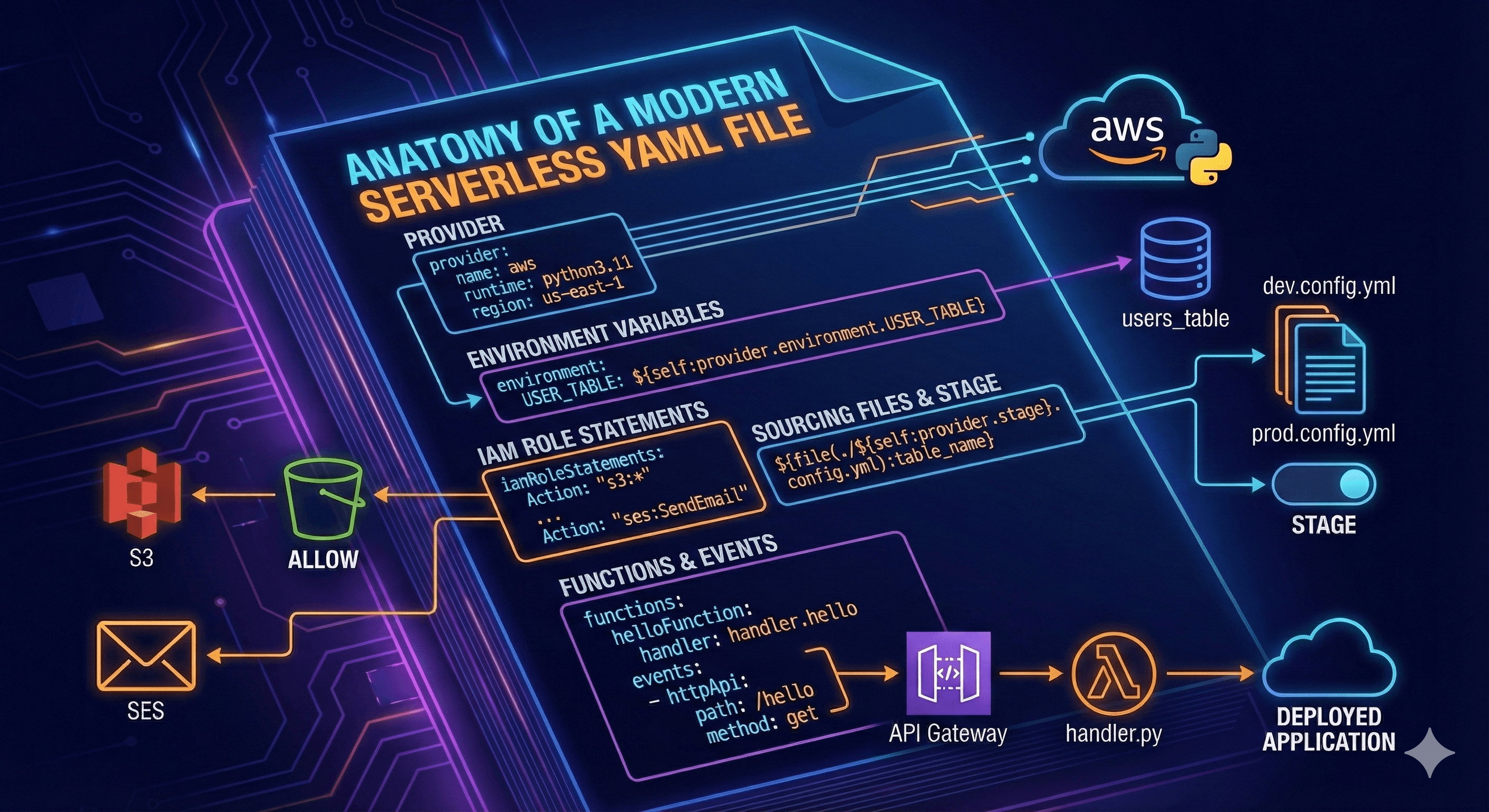
Table of Contents
In recent years, building serverless infrastructure has become incredibly accessible. Cloud providers like AWS, Azure, and Google Cloud Platform offer developers and engineers vast capabilities for deploying websites and applications without managing servers. The Serverless Framework has been a key driver of this adoption, simplifying the use of these powerful platforms. It achieves this by abstracting complex cloud architecture into a straightforward configuration file using YAML. In this post, we’ll dissect a modern serverless.yml file to understand how it defines a serverless architecture.
The serverless.yml File
The serverless.yml file is the heart of any Serverless Framework application. This single file describes your entire application infrastructure, from the programming language and cloud provider to resource permissions and API endpoints.
The most critical section of this file is the provider. Here, you specify which cloud platform you are targeting. The Serverless Framework supports major providers like AWS, Google Cloud, Microsoft Azure, and others. You also define the runtime environment for your functions. In the example below, we specify AWS as the provider and Python 3.11 as the runtime.
Example serverless.yml:
service: my-first-serverless-app
provider:
  name: aws
  runtime: python3.11
  region: us-east-1
This simple configuration is the foundation for an application with potentially unlimited computing power, hundreds of functions, and a scalable database. Let's dive deeper into what we can do with it, using AWS and Python for our examples.
Environment Variables
Managing configuration across different environments (like development, staging, and production) is straightforward with serverless.yml. You can define environment variables directly under the provider section. Let's add a variable for a database table name.
provider:
  name: aws
  runtime: python3.11
  environment:
    USER_TABLE: users_table
Now, the USER_TABLE environment variable is available inside every function in your service. You can also reference this variable elsewhere in your serverless.yml file to name resources dynamically.
To use this environment variable later in the file, you use the following syntax, which is similar to object traversal in many programming languages:
${self:provider.environment.USER_TABLE}
Sourcing External Files
For larger applications, it's best practice to split your configuration into separate files. The Serverless Framework provides a clean syntax for including variables from other files. For example, you might want a different table name for your development and production environments.
Imagine you have two config files in your project's root:
dev.config.yml:
table_name: 'dev_users_table'
prod.config.yml:
table_name: 'prod_users_table'
You can dynamically source the correct file based on your deployment stage.
Stage Variables
The stage variable is a special, built-in concept in the Serverless Framework used to define the environment you are deploying to (e.g., dev, prod, test). By default, the stage is set to dev.
Let's configure our serverless.yml to automatically use the correct configuration file based on the deployment stage. We use the syntax ${opt:stage, self:provider.stage} to reference the current stage.
Example serverless.yml with dynamic file sourcing:
provider:
  name: aws
  runtime: python3.11
  stage: ${opt:stage, 'dev'} # Default to 'dev' if not provided
  environment:
    USER_TABLE: ${file(./${self:provider.stage}.config.yml):table_name}
Now, when you deploy with serverless deploy --stage prod, it will automatically use the values from prod.config.yml. This technique is excellent for organizing configurations for databases, S3 buckets, and API paths across different environments.
IAM Role Statements
When working with AWS, you need to grant your application permissions to use other services. The Serverless Framework allows you to define these permissions directly within your serverless.yml file using iamRoleStatements. This generates the necessary AWS IAM roles for you.
Example: Granting S3 Access
This example gives your application full access to a specific S3 bucket named awesome-bucket-name.
provider:
  name: aws
  runtime: python3.11
  iamRoleStatements:
    - Effect: "Allow"
      Action:
        - "s3:*"
      Resource:
        - arn:aws:s3:::awesome-bucket-name
Example: Granting SES Access
This example grants your application permission to send emails using Amazon SES (Simple Email Service). Note that you must verify your domain or email address in SES separately.
provider:
  name: aws
  runtime: python3.11
  iamRoleStatements:
    - Effect: "Allow"
      Action:
        - "ses:SendEmail"
      Resource: "*"
Functions and Events
So far, we've discussed infrastructure, but what about the application logic? In serverless.yml, you define functions, which are the units of code that will run on your provider's platform (e.g., AWS Lambda). You then define events that trigger these functions, such as an HTTP request.
Let's create a simple HTTP endpoint. First, we need a handler file with our code.
handler.py:
import json

def hello(event, context):
    body = {
        "message": "Hello from Serverless!",
        "input": event
    }
    response = {
        "statusCode": 200,
        "body": json.dumps(body)
    }
    return response
Next, we define this function and its triggering event in serverless.yml.
serverless.yml function definition:
functions:
  helloFunction:
    handler: handler.hello
    events:
      - httpApi:
          path: /hello
          method: get
- functions:: This section lists all the functions in your service.
- helloFunction:: This is the logical name of your function within the Serverless Framework.
- handler: handler.hello: This tells the framework to look in the
handler.pyfile for a function namedhello. - events:: This section defines what triggers the function.
- httpApi:: This specifies that the function should be triggered by an HTTP request via AWS API Gateway's modern HTTP API. You define the URL path and the HTTP method.
With this configuration, deploying your service will create an AWS Lambda function and an HTTP API endpoint. A GET request to /hello will execute your code and return the response.
Conclusion
This post has covered the essential building blocks of a modern serverless.yml file. You've seen how to configure providers, manage environment variables across stages, grant permissions, and define functions with HTTP triggers. The Serverless Framework, combined with the power of cloud providers, empowers you to build and deploy scalable applications with incredible speed and efficiency. Mastering the serverless.yml file is your key to unlocking this potential.
Thanks for reading!